
Why my WLAN Pi is still one of my most valuable Wi-Fi tools
The WLAN Pi started as a simple, portable Wi-Fi diagnostics platform.
Over the years, it became a repeatable, neutral reference point for troubleshooting Wi-Fi performance.
Especially when the discussion turns into:“The Wi-Fi is slow”
Speedtest vs iPerf: Why we test this way
Modern WLAN Pi versions include Speedtest, and that’s great for user experience checks.
But Speedtest answers only one question:
“How fast does this feel right now?”
It does not answer:
- Where congestion starts
- Whether airtime is sufficient
- If QoS is actually working
- When jitter becomes unacceptable
That’s where iPerf3 comes in.
Airtime capacity testing with iPerf3 (UDP)
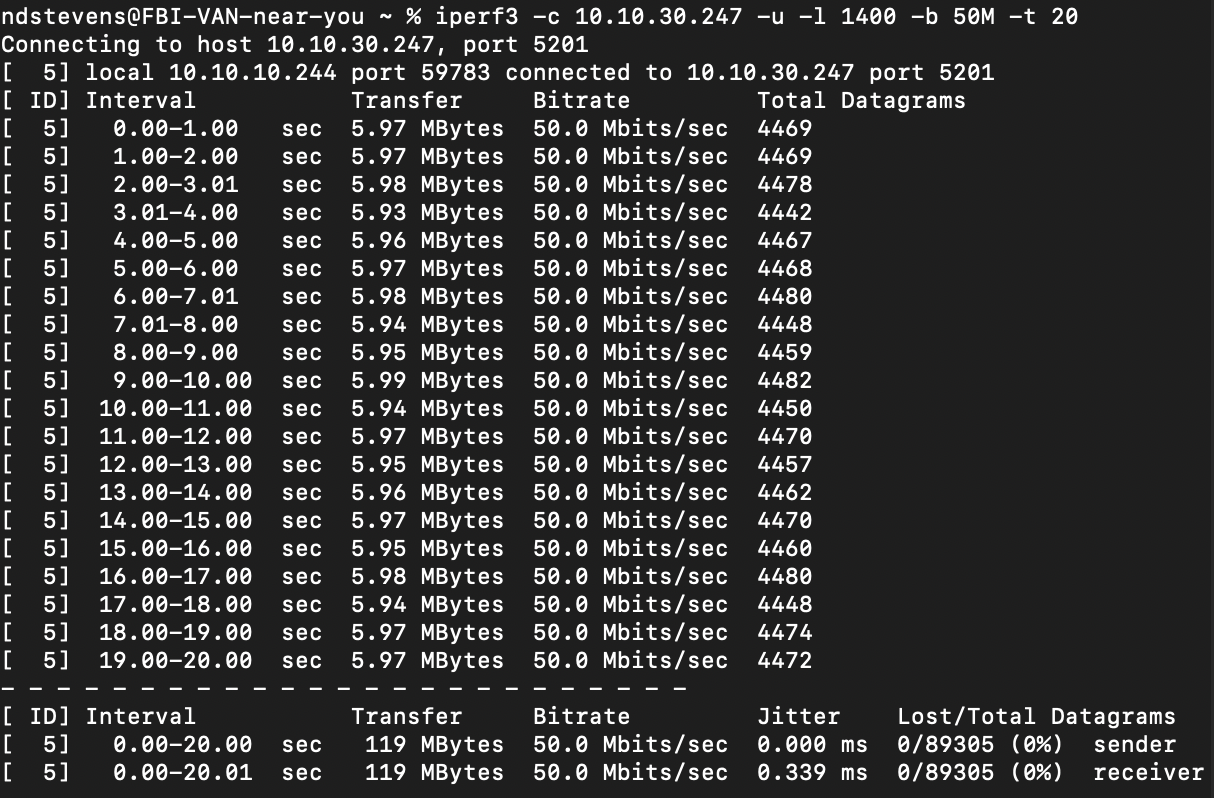
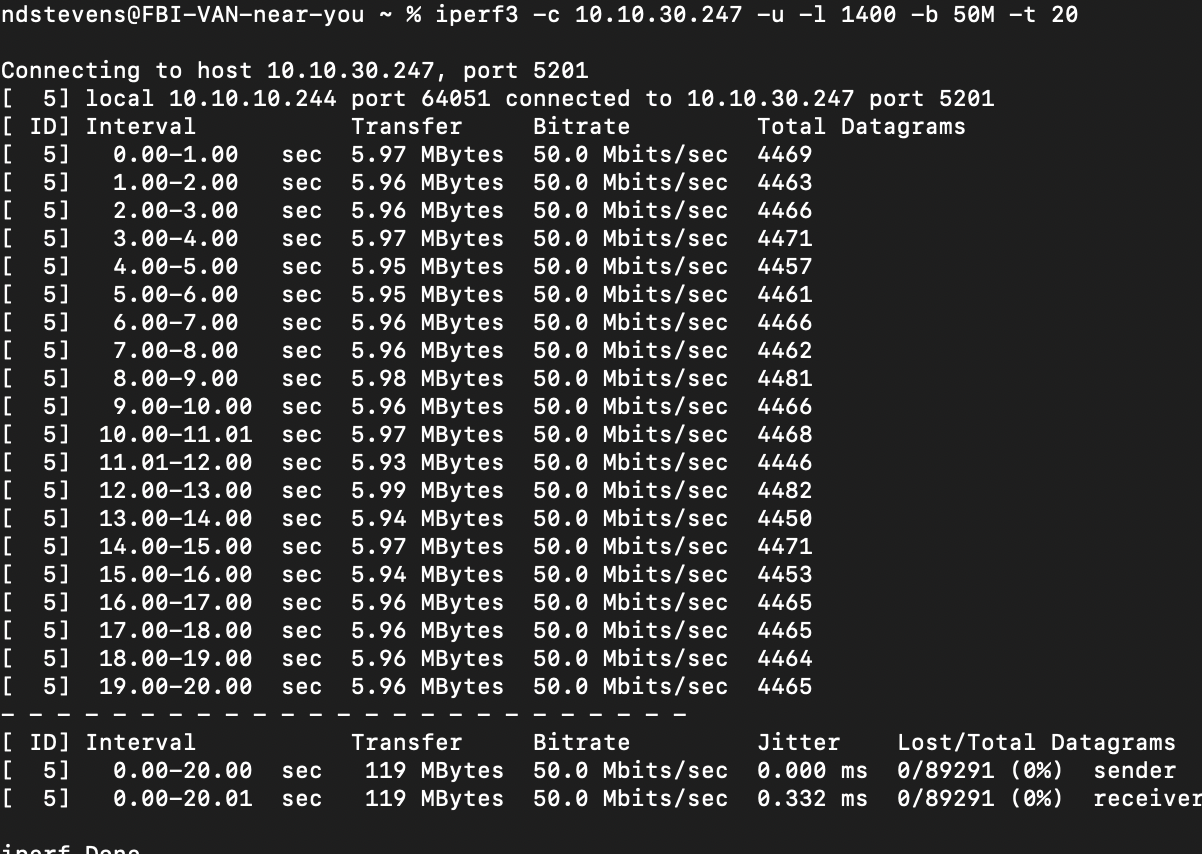
iperf3 -c 10.10.30.247 -u -l 1400 -b 50M -t 20
What this test does
This is a UDP offered-load test, not a speed test and it answers one very specific question:
“Can the Wi-Fi path sustain 50 Mbps without congestion”?
Parameters explained:
- -u (UDP)
Exposes loss and jitter immediately (no TCP retransmissions or backoff) - -l 1400
Keeps packets below MTU, preventing fragmentation and RF distortion - -b 50M
Forces a constant 50 Mbps load — stress, not peak speed - -t 20
Long enough to expose instability, not just bursts
What we evaluate with this test:
Airtime capacity
Can the Wi-Fi cell sustain the offered load without congestion?
Stability under load
Do we see:
- micro-drops
- retries
- traffic bursts
QoS / WMM behavior (indirect)
UDP reacts immediately to congestion — no TCP backoff to hide problems.
Latency-sensitive behavior
Jitter increases instantly when:
- RF quality degrades
- airtime contention starts
How we interpret the results
Key thresholds
- Packet loss < 1% acceptable for video
- Packet loss > 1–2% audible / visible degradation
- Jitter > 30 ms real-time communication issues
- Achieved bitrate < offered bitrate insufficient airtime
What this test proves
- The Wi-Fi cell can sustain 50 Mbps UDP
- No congestion at this load level
- Excellent latency stability (sub-millisecond jitter)
- Correct packet sizing (no fragmentation effects)
When to force TCP window sizing
Often performance issues are not RF-related.
Typical symptoms
- Low throughput on Wi-Fi
- Good RSSI and SNR
- No obvious RF problems
Test approach
iperf3 -c 10.10.30.247 -t 30 -i 1
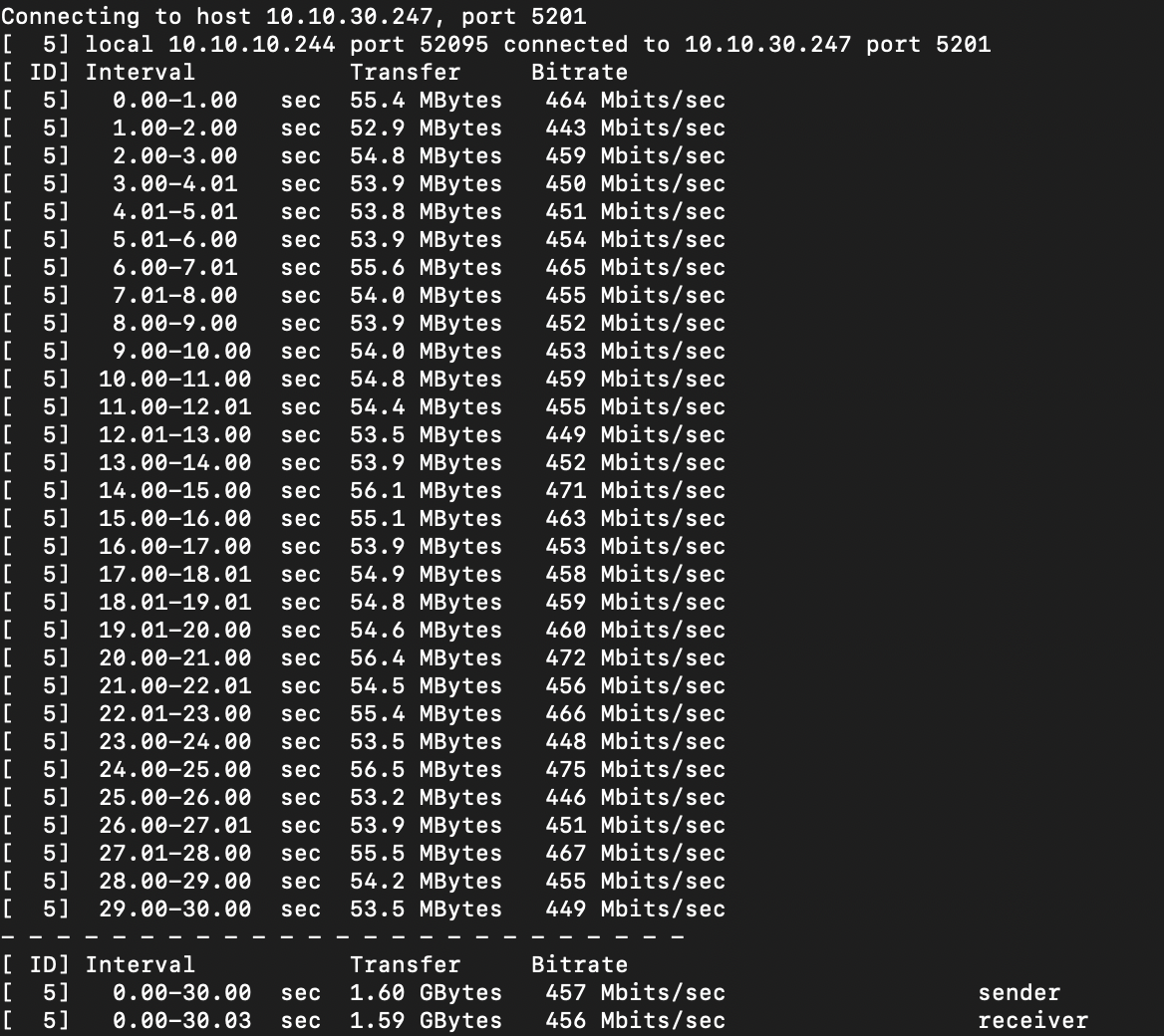
Then compare against forced window sizes:
iperf3 -c 10.10.30.247 -w 64K -t 30
iperf3 -c 10.10.30.247 -w 128K -t 30
If performance barely changes:
- The bottleneck is not TCP
- Look at airtime, loss, or latency
Small window sizes are also useful to simulate WAN conditions:
- Wi-Fi → VPN → Datacenter
- Teams / RDP / VDI
- Long RTT paths
MTU testing with iPerf3
While iPerf does not test MTU directly, it can expose fragmentation behavior.
iperf3 -c 10.10.30.247 -u -l 1400 -b 50M -t 20
iperf3 -c 10.10.30.247 -u -l 1600 -b 50M -t 20
With 1600 MTU (force fragmentation) Fragmentation typically results in:
-
Increased jitter
-
Higher loss
-
Reduced effective throughput
Why the WLAN Pi still matters
-
AP-on-a-Stick surveys
-
Troubleshooting asymmetric paths
-
Repeatable, vendor-neutral testing
Small device. Big truths about Wi-Fi

Andy Stevens, CWNE #486 en oprichter van MetaWiFi. Ontwerpt, meet en valideert Wi-Fi netwerken voor bedrijfskritische omgevingen en schrijft daarover op TalkAboutWiFi. Meer over MetaWiFi